Migrating from TrueNAS Scale to Unraid 6.12.10
Our story begins a few short months ago. A friend reached out to me, inquiring about which NAS software they should use. I’m an Unraid fan myself, but after hearing that they were focusing on storing files rather than running apps, I suggested TrueNAS Scale, as the low, low price of free is an easy sell.
Fast-forward a few months and this friend had fallen in love with the homelab hobby. Free software and self-hosting was an irresistible draw, and they had installed many different applications from the official and unofficial repositories. This began fine, but as the TrueNAS and K3S upgrades began rolling in, the stability of the applications suffered. Many would get stuck in states of “deploying,” “stopping,” or simply refusing to upgrade, with the only recourse being kubectl and helm commands that my friend did not have the background knowledge to run.
Endlessly frustrated by their apps breaking after “minor” version upgrades, my friend reached out to see if we could come up with a solution. By this point they had expanded their server to 9 total disks set up in 4 VDEVs, each mirrored internally, with a 256GB SSD as boot. The server’s raw capacity was 108TB, but due to the arrangement of the disks (as they were of mixed sizes across VDEVs), only 54TB were usable.
Armed with this information, I began exploring possible ways to migrate the data from TrueNAS to Unraid.
Disclaimer
This is not a tutorial. Please do not follow it like a tutorial. Doing so without a full understanding of what you are actually doing can cause permanent data loss. This blog post is known to the state of California to cause cancer. If you wish to attempt a migration from TrueNAS Scale to Unraid 6.12.x, and you are using this blog post as reference, please don’t. Unraid 6.13 should be coming out soon and will fix the problems presented in this post.
Training in Risk Tolerance
After researching on the Unraid forums for a while, I settled on an approach that I thought would work well for the 4 VDEVs of mirrored devices in the pool. First I would boot into Unraid, import the ZFS pool, then mark one of the drives in each mirror as “degraded.” Next, I would import those drives into Unraid and format them as XFS in the array. After copying all the data from the ZFS pool into the Unraid array, I would destroy the remainder of the pool and import that into Unraid, adding the parity disk as the final touch.
Simple? Not really. Elegant? Once again, no. Terrifying to do on ~35TB of valuable data? Definitely. But it seemed plausible, and my friend was not willing to spend another day with TrueNAS, so I began the process of attempting to import the pool.
A Small Speed Bump /s
Booting into Unraid, I fired off a zpool import to quickly create a mount point for the pool and plan the data transfer. The output was not encouraging.
root@Tower:~# zpool import
state: UNAVAIL
status: The pool can only be accessed in read-only mode on this system. It
cannot be accessed in read-write mode because it uses the following
feature(s) not supported on this system:
com.fudosecurity:block_cloning (Support for block cloning via Block Reference Table.)
org.openzfs:zilsaxattr (Support for xattr=sa extended attribute logging in ZIL.)
Easy error, I guess it’s readonly time!
root@Tower:~# zpool import -o readonly=on tank -f
This pool uses the following feature(s) not supported by this system:
	com.klarasystems:vdev_zaps_v2
cannot import 'tank': unsupported version or feature
Uh, well that looks less good. Let’s hop on over to the OpenZFS feature flags matrix and… the only version of OpenZFS that supports vdev_zaps_v2 is 2.2.x. Which probably means that Unraid is running…
root@Tower:~# zpool --version
zfs-2.1.14-1
zfs-kmod-2.1.14-1
womp womp
What is a Slackware?
This is probably where I should have given up, but I was not going to be stopped by something as simple as an outdated kernel driver version in an ephemeral OS that rebuilds its file system on every boot.
I knew that Unraid was build on Slackware, but as an Arch Linux user BTW myself (sorry), I had not had the displeasure of really using it. I quickly encountered a number of challenges that were going to make the next few hours of my life a living hell.
- Slackware has no standard package manager
- Unraid is built off of a customized Slackware Current
- Slackware 15 contains
glibc2.33 - Slackware Current has
glibc2.38 - Unraid 6.12.10 contains
glibc2.37
- Slackware 15 contains
- Slackware does not keep older versions of packages in their repositories
openzfsis not in the standard Slackware repositories, and needs to be compiled against the correct kernel version
I’m a pacman stan
The lack of package manager didn’t end up being as big of a problem as I thought it would be, as the community has developed slackpkg.
curl -O https://slackpkg.org/stable/slackpkg-15.0.10-noarch-1.txz
installpkg ./slackpkg-15.0.10-noarch-1.txz

sed -i 's/DIALOG=on/DIALOG=off/' /etc/slackpkg/slackpkg.conf
sed -i 's/CHECKGPG=on/CHECKGPG=off/' /etc/slackpkg/slackpkg.conf
echo "https://mirrors.slackware.com/slackware/slackware64-current/" >> /etc/slackpkg/mirrors
I threw some sed commands in there to quickly turn off slackpkg ‘s DIALOG feature and the CHECKGPG feature, as Unraid does not come with the required dependencies for those to work. *insert disclaimer about turning off gpg checking being dangerous*
This wasn’t going to be as easy as installing the the Slackware equivalent of base-devel, though, as I quickly learned. For starters, Slackware doesn’t really have a system for defining packages as dependencies of others, as you are recommended to simply install all of the packages for a given release.
All of them.
I’m sure that there is some reason for this approach, but any reason behind it escapes me. A side effect of this approach that I learned very quickly (and very painfully) is that you need to make VERY SURE to upgrade the aaa_* packages and glibc before any others.
slackpkg update
slackpkg upgrade aaa_base aaa_glibc-solibs aaa_libraries aaa_terminfo glibc
slackpkg upgrade-all
The internet recommends running slackpkg install-new before upgrade-all, once again because you are supposed to install every package in the repos, but it seemed to work fine in this case without it. In any case, I didn’t want to wait for KDE to install on a headless server.
Seriously, how is this the best approach to an operating system?
Dynamic Linking is so 1989
Three items need to be built for us to have a chance at mounting the ZFS pool.
- The Linux kernel. Unraid 6.12.10 uses kernel version 6.1.79, so that would be the version to download.
- Development headers for
libuuid. These are needed byopenzfs. openzfsitself.
Since openzfs needs to be built against the kernel version that will be using it, and Unraid does not include development headers, a few dependencies need to be installed.
slackpkg install openssl make gcc gcc-g++ cmake pkg autoconf automake guile gc bison binutils libtool m4 gettext kernel-headers elfutils bc util libtirpc
I’m Just Here for the Popcorn
The next step was to build the Linux kernel. By this point, I had found Steini1984 ’s project unRAID6-ZFS , which, as the name implies, allowed Unraid users to use ZFS before Unraid 6.12 added support. Running this script directly was not viable for me, as I did not want to make any permanent alterations to Unraid. I did use it as inspiration for many of these commands though, so shoutout to Steini1984.
# get the kernel version
[[ $(uname -r) =~ ([0-9.]*) ]] && export KERNEL=${BASH_REMATCH[1]} || return 1
# build the download link for the kernel
export LINK=https://www.kernel.org/pub/linux/kernel/v$(uname -r | head -c 1).x/linux-${KERNEL}.tar.xz

# download and extract the kernel
mkdir ./kernel
curl -Lo ./linux-${KERNEL}.tar.xz $LINK
tar -C ./kernel --strip-components=1 -Jxf ./linux-${KERNEL}.tar.xz

# move the patch files that Unraid is using into our working directory
rsync -av /usr/src/linux-$(uname -r)/ ./kernel/

cd ./kernel

# patch the kernel
for p in *.patch; do
	patch -p 1 < "$p"
done

# configure using Unraid's kernel config
cp /usr/src/linux-$(uname -r)/.config .
make oldconfig

# build the kernel!
make -j$(nproc) all
Now we just wait a billion minutes (the hardware is quite old), and we have a kernel!
The next dependency of openzfs that I needed was libuuid. Steini1984’s script pulls this random build of libuuid from 2014, which did not want to compile without disabling no-implicit-function-declaration.
curl -LO https://sourceforge.net/projects/libuuid/files/libuuid-1.0.3.tar.gz
tar -xzf libuuid-1.0.3.tar.gz

cd libuuid-1.0.3

CFLAGS="-Wno-implicit-function-declaration" ./configure
make

# STOP HERE IF FOLLOWING ALONG LIKE I EXPLICITLY SAID NOT TO
make install
Oops
Now, running make install as root in a random directory you just downloaded from the internet is never a great idea, but I was quite tired by this point and wasn’t really thinking straight.
Instantly upon running make install, the Unraid log window I had open began to spit segfaults. The web UI would no longer resolve, but the rest of the system seemed intact, so I cautiously continued for the time being.
If I were to do this again, I would attempt to symlink the development headers for libuuid into the /lib64/uuid folder or something, but I will leave compiling openzfs under Unraid without breaking the web UI as an activity for the reader.
Finally on to the good stuff: openzfs itself!
# download the openzfs source
export ZFS_VERS=2.2.4
curl -LO https://github.com/openzfs/zfs/releases/download/zfs-$ZFS_VERS/zfs-$ZFS_VERS.tar.gz

# extract it
tar -xzf zfs-$ZFS_VERS.tar.gz
cd zfs-$ZFS_VERS

# build it! if you didn't build the kernel in /root then alter here
./autogen.sh
./configure --with-linux=/root/kernel --with-linux-obj=/root/kernel
make -s -j$(nproc)
Hot-Swapping a Kernel Module
We theoretically now have a working build of openzfs for our kernel version. Time to take it for a spin! Thankfully, openzfs includes a script to help out the dumb people like me who aren’t kernel developers.
# unload existing zfs drivers
./scripts/zfs.sh -u

# load new zfs
./scripts/zfs.sh
Time to see if our work paid off!
root@Tower:~/zfs-2.2.4# ./zpool --version
zfs-2.2.4-1
zfs-kmod-2.2.4-1
Score!! We are now running openzfs 2.2.4 with the correct kernel module!
Unfortunately, due to my breaking of the web UI, I had to reboot Unraid to clear out that libuuid build.
I will spare you the details of tar’ing, sftp’ing, and untar’ing the build, but block below installs the minimal dependencies to run a compiled openzfs.
# AFTER updating glibc again,
slackpkg install gcc binutils openssl
ln -s /usr/lib64/libuuid.so  /usr/local/lib/libuuid.so
# then run the scripts to load the kernel modules
The Dangerous Part
Woo! We made it! All that’s left is… copying the data.
After zpool import tank, the imported ZFS pool looked like this:
NAME         SIZE  ALLOC   FREE  HEALTH
tank        49.1T  27.6T  21.5T  ONLINE
  mirror-0  16.4T  10.8T  5.54T  ONLINE
    sdd     16.4T      -      -  ONLINE
    sde     16.4T      -      -  ONLINE
  mirror-1  18.2T  16.4T  1.80T  ONLINE
    sdb     18.2T      -      -  ONLINE
    sdc     18.2T      -      -  ONLINE
  mirror-2  3.62T   277G  3.35T  ONLINE
    sdj     3.64T      -      -  ONLINE
    sdi     3.64T      -      -  ONLINE
  mirror-3  10.9T  92.6G  10.8T  ONLINE
    sdh     10.9T      -      -  ONLINE
    sdg     10.9T      -      -  ONLINE
Following the original plan, I erased a disk in each pool.
./zpool offline -f tank sdd
./zpool offline -f tank sdb
./zpool offline -f tank sdj
./zpool offline -f tank sdh
The pool was now much less happy. Poor pool.
NAME         SIZE  ALLOC   FREE    HEALTH
tank        49.1T  27.6T  21.5T  DEGRADED
  mirror-0  16.4T  10.8T  5.54T  DEGRADED
    sdd     16.4T      -      -   FAULTED
    sde     16.4T      -      -    ONLINE
  mirror-1  18.2T  16.4T  1.80T  DEGRADED
    sdb     18.2T      -      -   FAULTED
    sdc     18.2T      -      -    ONLINE
  mirror-2  3.62T   277G  3.35T  DEGRADED
    sdj     3.64T      -      -   FAULTED
    sdi     3.64T      -      -    ONLINE
  mirror-3  10.9T  92.6G  10.8T  DEGRADED
    sdh     10.9T      -      -   FAULTED
    sdg     10.9T      -      -    ONLINE
All the data was still accessible, and the Unraid web UI was still running, which is all that I had the energy to care about at that point. Let’s just get these “faulted” disks wiped…
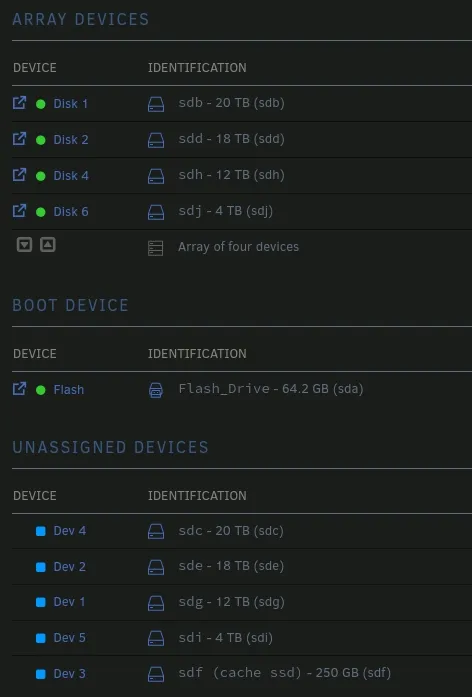
And we did it! All that’s left is to copy the data from /tank to /mnt/user, and sail off into the sunset.
The Sunset
Now that all the data is safely transferred off the ZFS pool, my friend is quite happy with how it turned out. I’m sure my head would be on a pike somewhere had it not gone to plan, but what’s life without a little risk?
My friend now has 88TB available instead of just 54TB, as we chose to just use one 20TB disk as parity. Unraid’s parity system is far better for mixed-capacity disks than ZFS, especially if you are happy with only being able to lose one disk at a time. Realistically ZFS was overkill for what my friend was doing, and they seem much happier now with Unraid’s app system.
Once openzfs 2.2.x makes its way into Unraid this migration will be a lot more practical to consider, but in the meantime I hope you enjoyed the story of my struggle!